

How to know if your AI feature is good enough to ship
A practical guide for PMs to move beyond vibe‑based AI quality with rules, evolving evaluation datasets, LLM judges, and real‑world feedback loops you can trust.
Over the past two years, Confluence Whiteboards has launched multiple AI features, including our latest work for the ability to create and edit Confluence content with Rovo. As the PM working on many of these features, I’ve spent a lot of time sitting with one uncomfortable question:
How do I know this output is good enough to ship when real teams will rely on it?
It’s tempting to answer that question with vibes: a handful of promising examples, a few internal demos, a feeling that it’s basically working. That might be fine for a low-stakes, fun AI experience. It’s not enough when your feature ships into real delivery workflows where trust, time, and reputation are on the line.
This practical guide is for PMs and product teams who are building AI features and want to move from this feels good to we have evidence this is good enough to ship. If you follow this process, you’ll end up with:
- A clear definition of good enough grounded in user outcomes
- An evaluation dataset that reflects real prompts and edge cases
- LLM judges that reliably assess quality at scale
- A data driven process that keeps your judgment, your evals, and real‑world quality in sync
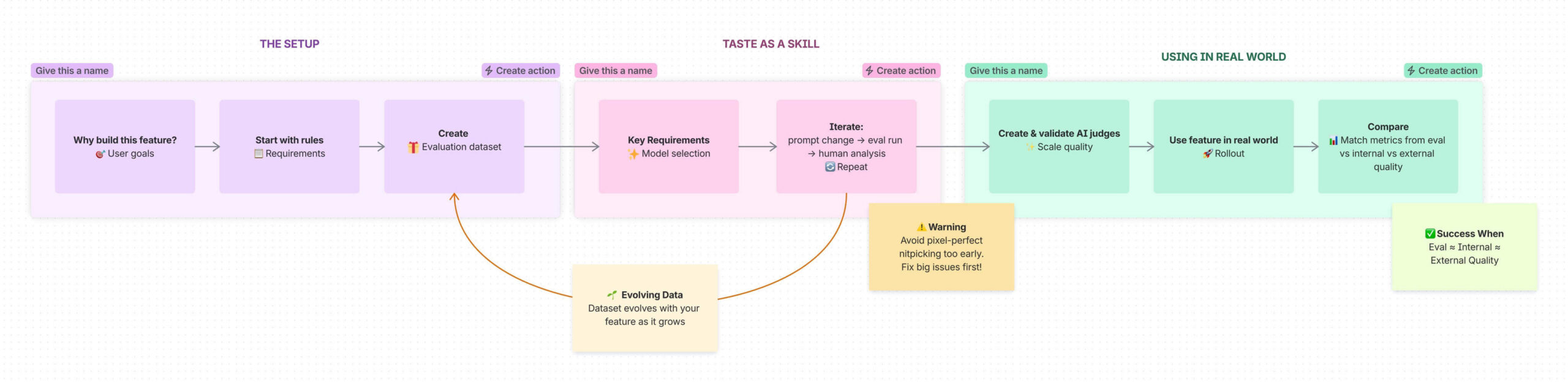
What does good enough AI quality mean?
Good enough is not occasionally great. It means your AI produces outputs that are consistently useful for the real job your user is trying to do.
When this applies
This matters most when:
- AI is used inside live projects, documentation, or planning workflows
- AI outputs shape decisions (prioritization, summaries for executive teams, etc.)
- Recovering from a bad output has a real cost: time, credibility, or delivery risk
Guardrails
- Don’t define quality as no obvious hallucinations.
- Don’t measure success only by time saved or usage if those gains come at the cost of trust.
- Don’t rely on a couple of polished examples to stand in for real‑world behaviour.
From here, everything you build: rules, datasets, judges, should tie back to this definition.
Before we start – what is a prompt?
This blog will contain references to two kinds of prompts: system prompts and user prompts.
A system prompt is coded into your feature, the requirements that an LLM must follow, combining rules, definitions, and examples. This often reads, honestly, like an encoded product requirements doc with sections like:
- Task context
- Output format
- General rules
- Domain‑specific logic
- Examples
User prompts are free‑form requests written by the user. They run within the system prompt’s guardrails.
1. Start with the why
🛑 For an AI feature, it is tempting to begin prompting or building right away, but yoursetup is the foundation on which the entire feature rests upon.
Before you write a single prompt, answer three questions:
- What end goal does the user have?
Consider whether the user will share, iterate on, collaborate around, or reuse the output as input to other work. - What will they use the output for?
Decide what level of fidelity the output is likely to be used for: will it be an internal sketch, a team‑level artefact for collaboration, or something that will be shared directly with stakeholders. - What happens if the AI gets it wrong?
Is the cost mild annoyance, confusion, re‑work, or a missed deadline?
These are examples of very simple questions that force you to deeply understand the customer pain, the opportunity space, and the landscape of competing solutions. This why is what every later quality decision anchors back to.
2. Turn requirements into concrete quality rules
Once you know what the feature should achieve, you can then determine the output requirements that define what good looks like.
Requirements are NOT a dataset. They ARE a set of rules and details of what you’d expect the LLM to generate, the starting point of your system prompt.
Think of this section as an encoded product requirements doc that covers:
- Task context – What is the model doing, and for whom?
- Output format – What shape should the answer take (bullets, canvas objects, headings, etc.)?
- General and specific rules – Tone, length, must‑haves, absolute must-nots
Helpful questions to answer explicitly
- What does the AI output look like if it’s good?
- What makes it most helpful for the user’s real goal?
- What makes it bad or unsafe (misleading, off‑topic, confusing, too confident)?
- What does a good user prompt look like?
- What are some lazy, messy, or half‑formed prompts we should still handle gracefully?
- What obvious edge cases or failure modes do we already know about?
These rules should be concrete (and may feel super obvious). But they ensure you understand the guides around your anchor: does this help achieve the feature’s goal?
3. Build an evaluation dataset that reflects real prompts
Your rules can now be used as the basis for your evaluation dataset. A good evaluation dataset of example user prompts is not about having rows and rows of data. A good eval dataset should:
✅ Cover your core use cases and capabilities while being diverse
✅ Include a mix of prompts difficulties (simple to complex)
✅ Attempt to mimic real world prompts, with both well-formed and messy examples
✅ Attempt to replicate the ‘real-world split’ of what the data will look like once released
✅ Try not to be repetitive, avoid near-duplicates
There are different ways to create your first version of this dataset, from data you already inline comment starthave thatinline comment end might mimic how users are going to prompt AI to creating a MECE (mutually exclusive, collectively exhaustive) framework for how to define actions that might be taken by AI for users.
Where prompts can come from
- Existing patterns in your product (eg. common workflows, templates or understanding of your users existing behaviour)
- Internal dogfooding: how your own teams naturally prompt the feature
- Structured brainstorming sessions with PMs, designers, and engineers
- Synthetic prompts that model realistic ‘bad’ behaviour: vague asks, partial instructions, or copy‑pasted fragments
4. Seriously, the evolving dataset
This dataset is a living manifestation of our feature. It should not be treated as static but instead develop and grow as the feature is built. You should add to it whenever you need:
- Discover a new failure type during testing →
new prompt - Realise a use case or content type is missing →
new prompt - Add a new capability to the feature →
new prompt - Need more information about a prompt (e.g., user segment, risk level) →
new column
This provides a dataset that doesn’t just confirm that the v1 of the feature is good. It also means that behaviours and prompts from real usage feed back into offline quality checks.
It is imperative that you have a single source of truth of this dataset, as the contents of dataset will change, and you’ll likely be building with many people around you. We did this using a Confluence database. This meant we had great version history, everyone had the right permissions for the right people, and we could slice and dice the prompts and columns as needed.
5. Develop taste as a product skill
As the PM of this feature your role is to care deeply about the quality of the output. Your taste becomes the source of truth for whether quality is ‘good enough’. Congrats, you’ve been given the role of Benevolent Dictator:
“The process begins not with metrics but with data and a single human expert – designate a single principal domain expert as the arbiter of quality.”
This doesn’t mean making decisions in a vacuum. It does mean:
- Spending time with lots of raw output
- Being explicit about why something passes or fails
- Writing down your judgment criteria so others can apply them
This is where you’re going to spend the most time but get the most valuable quality improvements. Do not shy away from this work; embrace it.
6. Choose the right model family
Before you worry about tiny details, you need to pick the right family of behaviour. Different models have different strengths and you need to find the right one for your feature.inline comment end
Different models will have different benefits, you must make tradeoffs on:
- Speed and latency
- Reasoning and planning
- Visual or spatial understanding
- Tone and writing style
You and your team should spend time comparing models against your requirements. This is about exploration, not perfection
- Use your dataset to check basic fit for the task.
- Focus on the key capabilities you want in the output
- Look for patterned strengths and weaknesses, not isolated wins
Don’t get stuck optimising small details at this stage. You’re picking the right engine, not tuning the last 5%.
7. Set up a tight loop: prompt change → eval run → human review
Once a model is selected, then the real grind can begin. For each prompt change you should be checking how your evaluation dataset fares.
- Your job is to spot the most obvious problem per output.
- Bucket and group issues back to engineering partners
- Iterate on prompts/logic to fix those issues
- And repeat again… and again… and again…
🤝 This process is truly collaborative. The tighter and more active your feedback loops, the better your output. Providing daily feedback lets your engineers iterate on prompts daily. We found the best way to do this was to include a Loom outlining an overview of the feedback. This way my engineers could hear the recap and see the issues that we were facing with real examples (and we got to avoid one more meeting!)
Avoid pixel‑perfect nitpicking too early. The most obvious bad behaviour you will identify from your generated output will eventually get there, going from really big issues to mildly off issues to tiny details.
Throughout this process, remember that you should also be evolving your understanding of the feature. Be comfortable changing your initial rules, and adding to or updating your dataset to better align with your end goal.
8. Scale yourself with AI judges
We can’t rely on real user traces or prompts, since they contain sensitive user‑generated content. We approximate real behaviour using methods like these. By investigating patterns from internal usage and creating an evaluation dataset, we can mimic how users actually prompt with AI without exposing or depending on private customer data. This lets us respect privacy constraints while still optimising the experience for better collaboration.
When the rollout begins (internal or external) you need a reliable way to be confident in your feature. Manual reviews won’t scale. Once you’ve got a reasonably stable feature, you’ll want LLM‑based judges that can mimic your judgement to get a strong idea of how good the feature is at generating content, while maintaining user privacy.
What AI judges do
- Evaluate each output against your written quality rules
- Return a simple pass/fail (0/1) to keep decisions fast and clear.
- Surface buckets of issues so humans can review exceptions (not every sample).
This is how you monitor quality as more users adopt the feature without inspecting everything by hand.
Trusting your AI Judges
As you should know by this point in the process, AI doesn’t always do as it’s told and can lie (better known as hallucinate). So a critical step is to validate your AI judges. Think of them as your protégée’s for assessing the feature quality, you want to train them up to be just as nit-picky as you.
You’ve done this before while raising quality. After you fix obvious issues with your feature, start validating your judges in parallel:
- Run judges against your eval set and compare their decisions to yours
- Group where they disagree and adjust the judge prompts
- For tricky areas, consider:
- Splitting judges by dimension (e.g., one for format, one for safety, one for usefulness)
- Using a different model that’s better at the relevant modality (text vs images vs structured data)
- And repeat again… and again… and again…
✅ Your judges are trustworthy when:
- Their assessments match your own consistently, for both good and bad cases
- They behave sensibly on internal usage samples (not just your eval set)
Until then, treat their recommendations as suggestions, not the absolute truth.
9. Connect eval quality to real‑world quality
You can now begin to track your quality. You want to make these three numbers roughly line up over time:
- Offline Evaluation quality – Results from your curated dataset
- Internal quality – How your own teams rate outputs in everyday use
- External quality – Judge metrics and signals from real customers (feedback, support tickets, opt‑outs, repeat use)
| Dataset | Evaluation | Internal | External |
|---|---|---|---|
| Quality (%) | Eval Quality | Internal Quality | External Quality |
❌ If this isn’t the case, you need to re-assess:
- Do you have high evaluation quality but low internal/external quality → Investigate your data set: is it missing real use cases or different fidelities of prompts?
- Low judge agreement with human ratings → Investigate your judge tuning and granularity.
10. Make AI quality a team sport
Quality is a team effort. While having a driver helps, it’s neither possible nor sustainable to do it alone. As a PM, you must work with your entire team to achieve the highest quality. This will look different for you and your team, for us this looked like:
- Product
- Owned rules and dataset creation
- Prioritised failures and bugs
- Interpreted outputs and aligns decisions to product goals
- Engineers / MLEs
- Built the feature and prompt logic
- Set up reporting, evaluation pipelines, and judge infrastructure
- Iterated quickly on prompts and judge behaviour based on feedback
- Design
- Helped craft example inputs and outputs
- Defined what ‘good’; looked like from a visual standpoint
- Participated in blitz sessions to stress‑test the feature
There are some easy steps in this process where you should pull your team in:
- Crowdsource prompts across the team instead of relying on one person’s intuition. Pull in ideas from across different crafts so a wide range of views are represented.
- Run testing blitzes where the whole team hammers the feature with new prompts, logs issues, and watches how it behaves under stress. This process spreads ownership across your team and creates real‑life examples (and real frustration) when things go wrong.
- Keep your rules, dataset, and judge logic visible in a shared space like Jira and Confluence so everyone can see how decisions are made.
When in doubt, come back to the core questions:
What job is this AI doing?
What are the stakes if it’s wrong?
Does the evidence, from evals, judges, and real usage, support shipping this today?
If you can answer those with confidence, you’re much closer to good enough to ship. Don’t forget to have fun with it it! AI does some pretty weird and wonderful things. Those edge cases are often where you learn the most!